Extra Functions (G4732190)
Import an Install File
Install files may be created and sent to you by Jaguar Land Rover (JLR) for specific tests. Import the install file before testing by selecting the Load icon.
The engineer who supplies the install file must also supply any instructions needed.
- The install file is in an .INI file format. It can be configured to trigger logging when a certain condition occurs.
- For example: Diagnostic Trouble Codes (DTC) recorded, or temperature achieved.
- The install file is also capable of being configured to trigger from a state of change.
- For example, when an issue occurs, select Cruise Cancel on the vehicle's steering wheel. The result will capture a pre and post trigger time defined by the engineer that created the install file.
Logging Diagnostic Messages Only
TOPIx Cloud and Diagnostics over Internet Protocol (DoIP) Vehicle Communication Interface (VCI) can be used on a vehicle to run a test or application, with the JLR VCI connected to another machine and with the JLR VCI Logger enabled. The data file captured will only contain diagnostic messages.
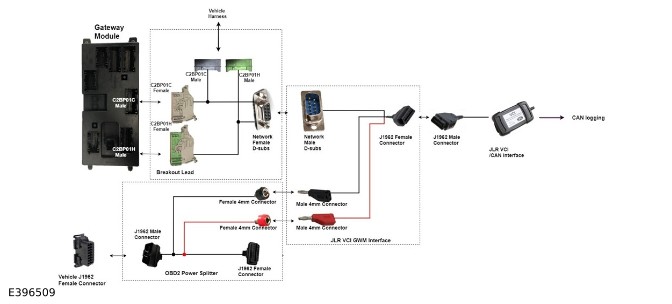
Connect as shown in the example below and select the box for diagnostic filter on the install page.
The JLR VCI Logger MUST be used on a different machine to the one that is active with TOPIx Cloud.
JLR VCI Logger DoIP example:

Controller Area Network (CAN) Logger Multi-CAN example:

Enable Trigger
With the Enable Trigger box selected, the trigger icon can be used when an issue is observed. Alternatively, the JLR VCI Logger can be used manually by selecting the START icon and the STOP icon.
- When the start icon is selected the JLR VCI Logger will record data for 30 seconds for each trigger and 60 seconds after being triggered.
- The start timestamp will appear in the results.
- If an install file has been loaded and the Auto-restart icon is selected, the JLR VCI Logger will automatically run and capture data determined by the pre and post trigger durations.
-
JLR VCI Logger will then automatically reset and wait for the next trigger point to capture data again.
- This feature can be used to detect quiescent drain on the vehicle battery, caused by a module wake-up message.